 Inkhaus
Touch and buttons#
You can use the device with your finger, with the rocker, or both.
Touch#
| Gesture | What it does |
|---|---|
| Tap a widget | Does its main action: switches a light, a switch or an automation, opens a popup for a media player or notifications. |
| Tap a button inside a widget | Shutter up / stop / down, thermostat minus / plus, vacuum start / pause / dock. |
| Long press a light (about half a second) | Opens the brightness popup. |
| Tap a sensor, binary sensor or energy widget | Opens its history graph. A long press does too. |
| Tap a tab | Switches the tab. |
| Tap "updated" (status bar) | Fetches fresh states now. |
| Tap the battery (status bar) | Opens Settings. |
| Tap the screen while it sleeps | Wakes it, if Sleep mode is Touch or Touch & rocker. That first tap is not used as a click. |
Taps on a widget that shows a dotted frame (unavailable) are ignored.
The rocker#
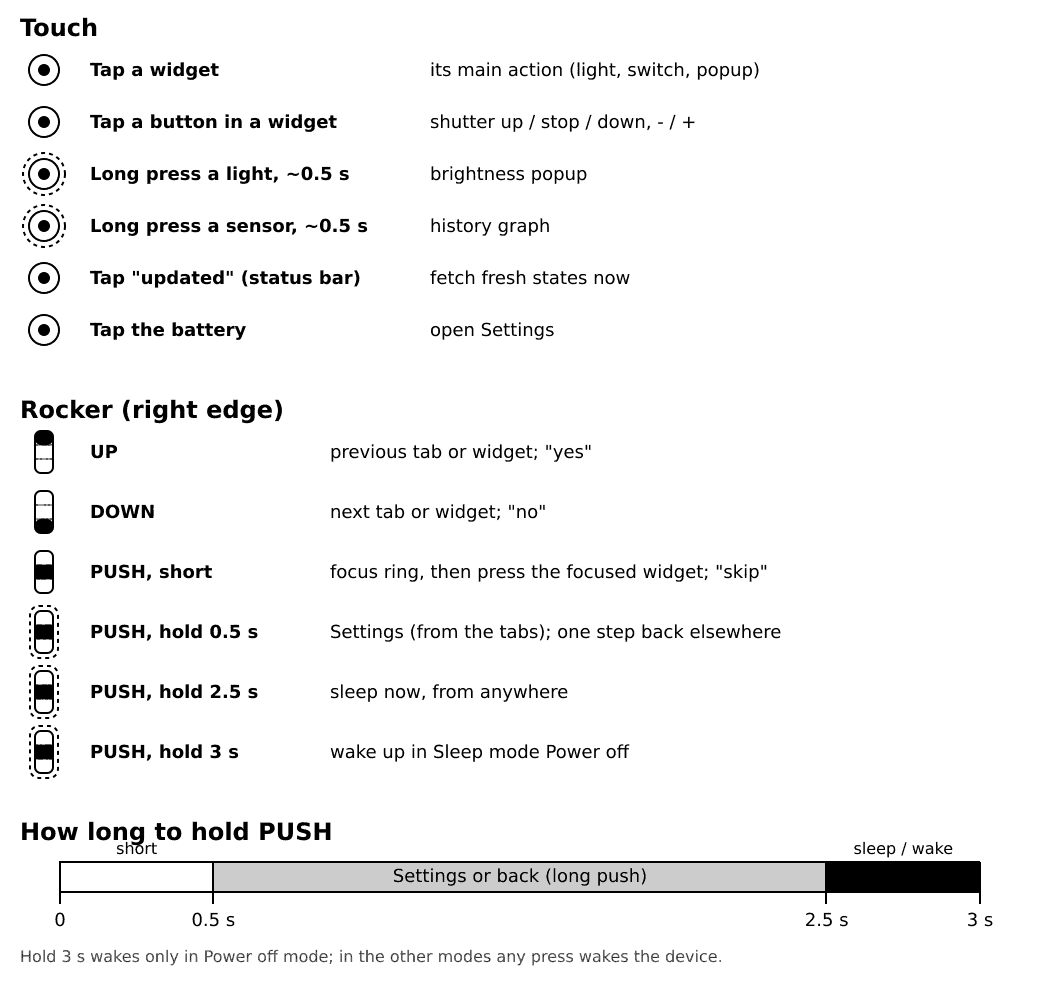
The rocker is the 3-way button on the right edge of the device. You can push it up, push it down, or press it in (push). Hold the push for a longer press. The durations differ, so here is the whole list:
| Press the push for | Name | What happens |
|---|---|---|
| less than 0.5 s | Push | Normal press: starts the focus ring or activates. |
| 0.5 s to 2.5 s | Long push | Opens Settings or goes one step back. |
| 2.5 s or longer | Hold | Sleep now, from anywhere. |
| 3 s, when the device is asleep in Power off mode | Wake hold | Switches the device on. |
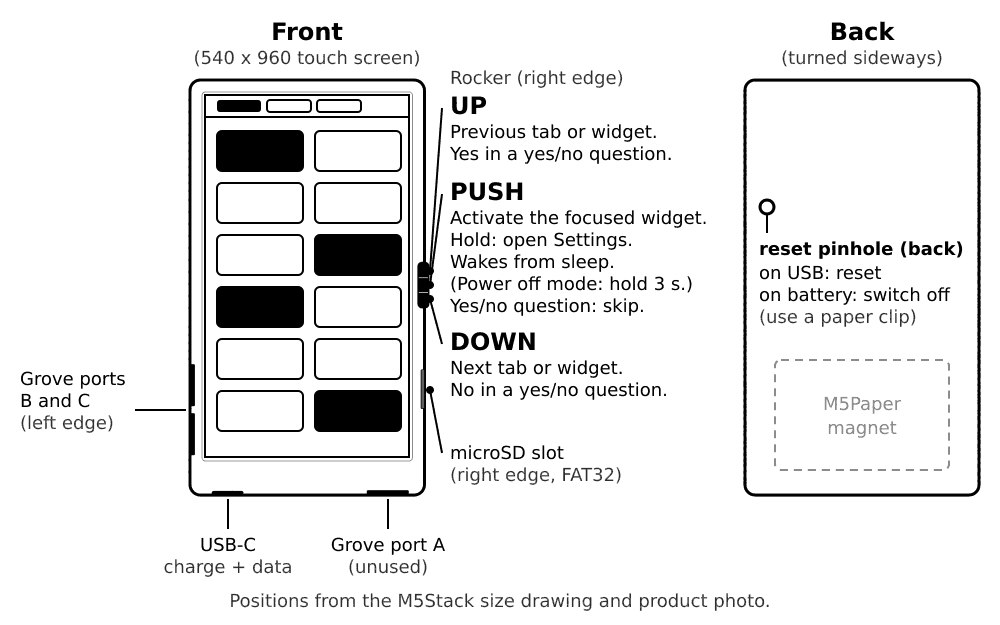
On a tab screen:
| Rocker | What it does |
|---|---|
| Up / down | Previous / next tab. In landscape, up points left. |
| Push | Starts the focus ring: a thick frame on the first widget. |
| Up / down (ring is on) | Moves the ring to the previous / next widget. After the last one it returns to the tabs. |
| Push (ring on a light, switch or automation) | Does the same as a tap. |
| Push (ring on a shutter, thermostat or vacuum) | Selects one of its buttons. Up / down moves between the buttons, push presses one. Long push leaves. |
| Long push (about half a second) | Opens Settings (from the tabs), or goes one step back (in the ring, a popup or in Settings). |
| Hold push for 2.5 seconds | Puts the device to sleep right away, from anywhere. |
Keep the push down for the full time and let go when the screen changes.
The first rocker press after the device wakes both shows the ring and does its job, so you do not need to press twice.
Yes or no questions#
Some actions ask first, for example "Clear all" notifications or a firmware update. Answer with the rocker:
- Up = yes
- Down = no
- Push = skip
This is on purpose: a push can tilt the rocker by accident, so push never means "yes".
Wake and sleep#
- Wake: press the rocker (in Sleep mode Power off this is not enough, see below). With Sleep mode Touch or Touch & rocker, a tap on the screen wakes it too. With Sleep mode Power off, hold the rocker push for about 3 seconds.
- Sleep: the device sleeps by itself after the idle timeout (20 seconds by default). To sleep at once, hold the rocker push for 2.5 seconds, or use Settings, Sleep now.
More on this in Sleep and battery.
The reset hole (pinhole)#
On the back is a tiny hole, the "pinhole", with a button behind it. Press it with a pin or a paper clip. What it does depends on the power:
- With the USB cable plugged in: it restarts the device. Files and settings are kept. This is what the guide means by "restart the device".
- On battery only: it switches the device off. Switch it on again with the rocker (hold the push for 3 seconds, if the Sleep mode is Power off).
So to restart reliably, plug in the USB cable first. Use the pinhole when the device does not react to anything.
If it doesn't work: if the screen stays blank, see Troubleshooting.