 Inkhaus
Tabs and layout#
config.yaml has a list of tabs. Each tab has a title and a list of widgets.
version: 1
tabs:
  - title: Living room
    widgets:
      - entity: light.living_room_ceiling
      - entity: cover.living_room_shutter
  - title: Whole house
    widgets:
      - entity: climate.bedroom
- entity: weather.homeLimits#
| What | Limit |
|---|---|
| Tabs | 1 to 16 |
| Widgets per tab | up to 24 |
| Groups | any number, up to 16 entities each |
| File size | up to 64 KB |
Tab titles#
Keep them short: long titles are cut off to fit the tab button. In portrait there are 4 tab slots, in landscape 5. With more tabs than slots, the last slot becomes a "..." button that moves on to the next group of tabs.
Order and flow#
Widgets fill the grid from left to right, then top to bottom, in the order of your list. A wide widget takes two or three cells and jumps to the next row if it does not fit. When a tab has more widgets than fit, it splits into pages: use the page switcher at the bottom, or the rocker (it moves on to the next page after the last widget).
Columns per tab#
Every tab can use its own grid:
- title: Climate
  landscape_columns: 4
  portrait_columns: 3
  widgets:
    - entity: climate.living_room
- entity: climate.bedroom| Key | Values | Default |
|---|---|---|
landscape_columns | 4 or 5 | 5 |
portrait_columns | 2, 3 or 4 | 2 |
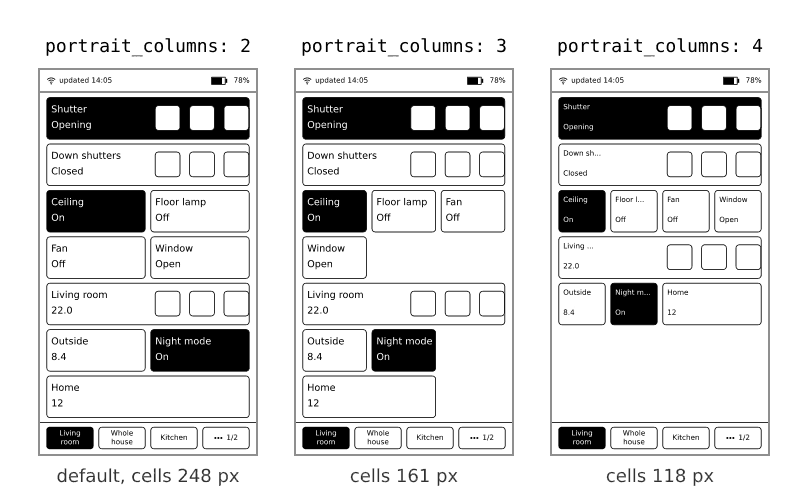
Details are in The screen. Which widget sizes exist: Widgets, Sizes.
Groups#
A groups: entry at the top of the file lists entities of one kind (for example all shutters) under one name. A widget with group: then controls all of them with a single tap. See Widgets, Cover or light group.
The clock and time zone#
The device sets its own clock over the network when it connects. The default time zone is Central Europe. To change it, add a POSIX time zone string at the top of config.yaml:
timezone: "CET-1CEST,M3.5.0,M10.5.0/3"Examples: GMT0BST,M3.5.0/1,M10.5.0 (London), EST5EDT,M3.2.0,M11.1.0 (New York). The time zone is used for the clock, the "updated" time and the wake schedule.
What you'll see: the times in the status bar match your local time.
If it doesn't work: a wrong string gives odd times, not an error. Look up "POSIX TZ string" plus your city.
Check your file#
After you edit config.yaml, restart the device (plug in USB and press the pinhole on the back once; see Touch and buttons). Then open Settings, the Config row says OK or names the first mistake with its line. See Settings.